Page 1 of 1
Columnizer and lists
Posted: Tue Mar 06, 2012 3:32 pm
by wpompen
I've got a strange thing, when I invoke AC then the unordered lists appear different than without AC.
Somehow the indent space is different...

- ac1.png (72.49 KiB) Viewed 14978 times
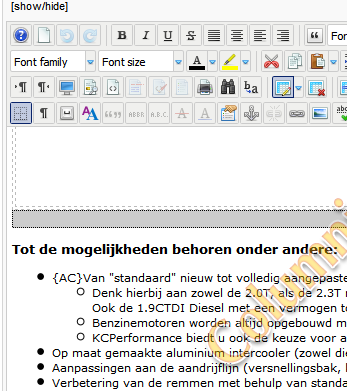
- ac2.png (40.59 KiB) Viewed 14978 times
Attached screenshots...
Do you have an idea how to fix this? Thanks a lot!

Edit: in the second column the bullets are not displayed as triangles but as normal dots also...
Re: Columnizer and lists
Posted: Wed Mar 07, 2012 4:16 pm
by Vasiljevski
Have you tryed to move {AC} outside of the list?
Not after the first bulletin?
Re: Columnizer and lists
Posted: Fri Mar 09, 2012 2:19 pm
by wpompen
First: thanks for helping...
Indeed I've tried this, same result.
Does it maybe have something to do with the class "hyphenate", does this one overrule the type of bullet that will be used?
Also: in the second column the list starts with <li> instead of opening with <ul> (edit 1)
(edit2)
After modifying the code of the article to this:
<li>blablaACBR</li>
</ul>
<ul>
<li>blabla
... the bullets are shown correct
Re: Columnizer and lists
Posted: Tue Mar 13, 2012 1:13 pm
by Vasiljevski
hyphenate might be the cause of this. You could try to disable hyphenate from plugin settings.
Can you try this:
<li>blabla</li>
</ul>
ACBR
<ul>
<li>blabla
ACBR marks the spot where the text will be split into columns.
Re: Columnizer and lists
Posted: Tue Mar 13, 2012 3:40 pm
by wpompen
The first line is placed down when I use
{AC}<ul>
<li>....
When you place {AC} inside the list, the extra empty paragraph above the list is gone and all the first lines are aligned.
Plus, when I use JCE (or someone without programming knowledge) I'd get something like this (paste in code editor).
The list is broken, even with hyphenator off.
<ul>
<li>{AC}1
<ul>
<li>10</li>
<li>12</li>
<li>13</li>
</ul>
</li>
<li>ACBR2
<ul>
<li>21</li>
<li>22</li>
<li>23</li>
</ul>
</li>
<li>ACBR3
<ul>
<li>31</li>
<li>32</li>
<li>33{/AC}</li>
</ul>
</li>
</ul>
When I punt in the breaks in the code editor, paragraphs are added (probably a JCE-thing) and the columns are no longer aligned...
<ul>
<li>{AC}1
<ul>
<li>10</li>
<li>12</li>
<li>13</li>
</ul>
</li>
</ul>
<p>ACBR</p>
<li>2
<ul>
<li>21</li>
<li>22</li>
<li>23</li>
</ul>
</li>
<p>ACBR</p>
<li>3
<ul>
<li>31</li>
<li>32</li>
<li>33{/AC}</li>
</ul>
</li>
When used like this, the bullets are no longer correct:
<p>{AC}</p>
<ul>
<li>1
<ul>
<li>10</li>
<li>12</li>
<li>13</li>
</ul>
</li>
</ul>
<p>ACBR</p>
<li>2
<ul>
<li>21</li>
<li>22</li>
<li>23</li>
</ul>
</li>
<p>ACBR</p>
<li>3
<ul>
<li>31</li>
<li>32</li>
<li>33{/AC}</li>
</ul>
</li>