Page 1 of 1
Gallery albums
Posted: Tue May 21, 2013 9:56 am
by ankris
Hi,
I would like to create a Gallery from a folder which contains only subfolders with images in them. The Gallery folder itself doesn't have any images in it.
Something like the image I posted below.
If I put {Gallery folder} into the article, nothing shows. The albums are not created. I have to put at least 1 image into the "Gallery" folder
for the albums to be created. I don't like this. How can I change this behaviour ?
Re: Gallery albums
Posted: Wed May 22, 2013 5:15 pm
by fourmat
I am having a similar issue. I thought I read a post in the past that said an empty album would be replaced with the default album icon? This is not working for me using the Classic gallery template. Any advice?
Re: Gallery albums
Posted: Mon May 27, 2013 3:25 pm
by Vasiljevski
Hmm this is strange, I just tested this and saw that in case ankris described (folder that only contains folders with images) I did see albums:
parks->animals->[images]
|| ->landscape->[images]
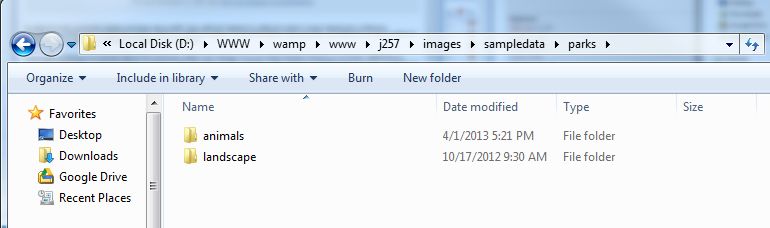
- folderview.jpg (24.18 KiB) Viewed 15755 times
Used: {AG}parks{/AG}
Here is the result:
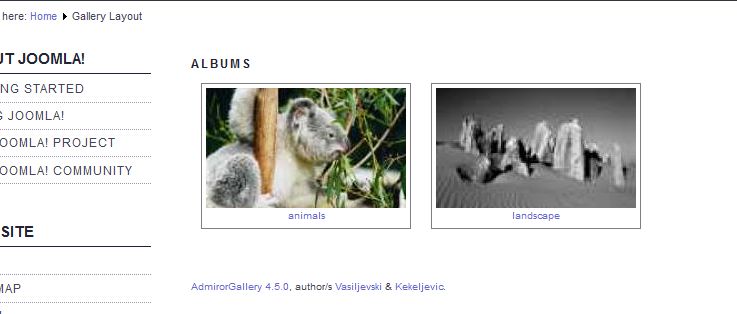
- siteview.jpg (28.23 KiB) Viewed 15755 times
Did I misunderstood your intension's?
Re: Gallery albums
Posted: Mon May 27, 2013 10:24 pm
by ankris
That' exactly what I mean, but it doesn't work for me like that.
I get a blank page until an image would be placed inside the parks folder.
Re: Gallery albums
Posted: Sun Jun 23, 2013 10:48 am
by bbdoc
Hello,
I'm new to Admiror Gallery, and really love it (coming from Ozio, but Admiror is far better!).
Anyway, I'm having the same issue... Admiror doesn't want to show me an album unless I put at least a picture in it.
Vasiljevski, if I look at your example, this also works fine for me, because you have at least one picture in your "animals" and "landscape" directory, but if you try to create one more subdirectory, e.g. :
Code: Select all
- test
   - parks
       - animals
       - landscape
and then try to show {AG}test{/AG}
You'll see you won't get anything, because you don't have any picture in your "parks" folder.
In my opinion, it should show the folders, either with a default album pic (that could be set in config) or using the first picture of the first subdirectory it finds (in this case the first picture in "animals" directory...
Thanks for your support
Re: Gallery albums
Posted: Thu Jun 27, 2013 12:10 pm
by Vasiljevski
Hmm I see what you mean and thanks for clearing this for me

Both of you are wright, it should display some default Thumbnail for folder.
Here is a quick fix, open \plugins\content\admirorgallery\admirorgallery\classes\agGallery.php and make the following changes:
Comment out line 205:
Code: Select all
                if (!empty($thumb_file)) {
                    $this->Album_generateThumb($folderName, $thumb_file);
                } else {
                    //continue; // SKIP IF NO THUMB IMAGES
                }
Also replace line 209 with:
if(!empty($thumb_file))
{
$html.='<img src="' . $this->sitePath . PLUGIN_BASE_PATH . 'thumbs/' . $this->imagesFolderName . '/' . $folderName . '/' . basename($thumb_file) . '" />' . "\n";
}
else
{
$html.='<img src="' . $this->sitePath . PLUGIN_BASE_PATH .'defaultAlbum.png" />' . "\n";
}
And add attached image

- Default album thumb
- defaultAlbum.png (3.8 KiB) Viewed 15630 times
to plugins\content\admirorgallery\admirorgallery or create your own, just be sure to name it defaultAlbum.png
This should fix this issue. I will add this to the future releases
Re: Gallery albums
Posted: Mon Jul 15, 2013 1:41 pm
by ankris
I made the changes to include the default folder thumbnail.
Re: Gallery albums
Posted: Thu Jul 18, 2013 9:51 am
by bbdoc
Thanks a lot for this correction...
Anyway, in a next version, would be nice to add the possibility to define a personal image folder (so one that would not appear as an image with the parent folder, but would only be used as the folder image).
Thanks